Big changes came to Amazon FBA in 2026. First, Amazon stopped offering labeling services. Second, resellers are now required to use Amazon barcodes. As a result, more sellers are seeing their inventory rejected at warehouse gates, paying extra processing fees, or even losing their right to claim refunds for lost stock.
This article breaks down the two major policy updates you need to know, goes through Amazon’s official labeling requirements, walks you through five common labeling mistakes, and gives you practical tips to avoid them.
Two Major FBA Labeling Changes in 2026
Change 1: Amazon Ends Its FBA Labeling Service (Effective January 1, 2026)
Amazon no longer labels products for sellers. If you created a shipment before January 1, 2026, you’re fine. But any new shipment created after that date must be labeled by you or someone you hire. If you don’t label correctly, Amazon may mark your inventory as “unscannable” or “damaged” — and you won’t be eligible for reimbursement.
What you should do:
-
Check the creation date of your current shipments
-
For all new shipments after January 1, set up an internal labeling process or find a third party to help
Change 2: Resellers Must Use Amazon Barcodes (Effective March 31, 2026)
Brand owners can still use manufacturer barcodes like UPC or EAN and skip labeling. But resellers must use Amazon barcodes (FNSKU or X00 labels). If you’re a reseller and you don’t switch in time, your inventory may be treated as “defective” and delayed at the warehouse.
| Seller Type | Labeling Required? | Barcode Type | Effective Date |
|---|---|---|---|
| Brand Owner | Optional (can skip) | Manufacturer barcode (UPC/EAN) | March 31, 2026 |
| Reseller / Distributor | Required | Amazon barcode (X00/FNSKU) | March 31, 2026 |
What you should do:
-
Figure out which type of seller you are — brand owner or reseller
-
If you’re a reseller, start switching your inventory labels well before March 31

Official FBA Labeling Rules You Need to Know Before Your Shipment Gets Rejected
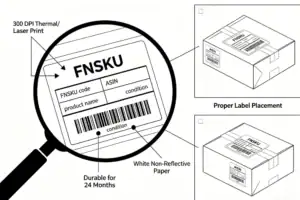
Technical Requirements for FNSKU Labels
-
Printer type: Thermal or laser. No inkjet printers.
-
Resolution: At least 300 DPI
-
Label paper: White, non-reflective, removable adhesive
-
Label size: Between 2.54 cm x 5.08 cm and 5.08 cm x 7.62 cm
-
Durability: Must stay scannable for 24 months
Label Content and Format
-
Must include: FNSKU, ASIN, product name, and condition
-
Font: Arial or Times New Roman
-
Color: Black on white (highest contrast)
-
Margins: 0.25 inches on each side, 0.125 inches on top and bottom
Where to Stick the Label
-
Stick it on the front or side of the package — somewhere visible
-
Don’t stick it on curved surfaces, corners, or seams
-
Cover up any other visible barcodes (except serial number or Transparency codes)
-
For cartons: Put at least 4 labels on different sides so it’s always scannable
Outer Carton Label Rules
-
Place the label right in the middle of the largest side
-
Don’t put it on seams or corners
-
Don’t cover it with tape — tape reflects light and messes up scanning
5 Most Common Labeling Mistakes (Almost Everyone Makes at Least One)
Mistake 1: Mixing Up FNSKU and ASIN
What happens: You put the FNSKU label for Product A on Product B. Customers order A but get B.
The fallout:
-
More complaints and returns
-
If Amazon relabels the items, things can get even messier
How to avoid it:
-
Scan every label and match it to the actual product before shipping
-
Set up a three-step check: label → scan → pack
Mistake 2: Poor Label Print Quality
What happens: You use an inkjet printer, the ink fades, or the resolution is too low. The warehouse scanners can’t read the barcode.
The fallout:
-
Human handling required — usually a 2 to 5 day delay
-
Possible extra processing fees
-
Worst case: the label becomes completely unreadable
How to avoid it:
-
Make sure your resolution is at least 300 DPI
-
Go with thermal transfer instead of direct thermal — it lasts longer
-
Clean your print head regularly and test-scan your labels

Mistake 3: Poor Label Placement
What happens: You put the label on a seam, a curved surface, or cover it with tape.
The fallout:
-
The scanner fails multiple times
-
More manual handling, more cost
How to avoid it:
-
Keep labels at least 0.63 cm away from package edges
-
Stick labels on flat surfaces — never across corners
-
Never cover barcodes with transparent tape
Mistake 4: Ignoring the New Reseller Rule
What happens: You’re a reseller, but after March 31, you still ship using manufacturer barcodes.
The fallout:
-
Your whole shipment may be flagged as “defective”
-
You might lose reimbursement eligibility
-
Warehouse processing delayed by 4 to 6 weeks
How to avoid it:
-
Confirm whether you’re a brand owner or a reseller
-
If you’re a reseller, finish switching to Amazon barcodes before March 31
Mistake 5: Labels Getting Damaged During Shipping
What happens: Heat and humidity on a cargo ship make thermal labels fade. Friction during transit rubs the barcode off.
The fallout:
-
Labels are unreadable by the time they reach the FBA warehouse
-
Rejection or extra fees
-
Lost inventory with no chance of reimbursement
How to avoid it:
-
Use waterproof labels or laminate them
-
Pick thermal transfer over direct thermal — it handles moisture better
-
Pack your goods so labels aren’t rubbed or squeezed during transit
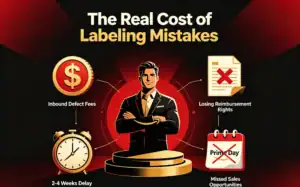
The Real Cost of Labeling Mistakes
Inbound Defect Fees
Since January 15, 2026, Amazon has charged inbound defect fees for mislabeled shipments. The fee depends on the size and weight of your products. If a medium-sized shipment gets rejected, the defect fee alone can easily run into hundreds of currency units — and that’s not counting the cost of relabeling or the sales you lose while your stock sits idle.
| Product Size Tier | Weight Range | Fee Level |
|---|---|---|
| Small standard size | Light | Lower |
| Large standard size | Light to medium | Medium |
| Small bulky | Light | Higher |
| Large bulky | Light | High |
| Special bulky | Heavy | Highest |
Losing Your Right to Reimbursement
Amazon’s policy is clear: if your inventory isn’t labeled correctly, you can’t get reimbursed. So if your stock gets lost or damaged and the labels are wrong, Amazon doesn’t have to pay you. And there’s almost no way to appeal. One wrong label can wipe out your reimbursement protection for an entire shipment.
Time and Opportunity Cost
Sellers often underestimate the time cost of a labeling mistake. A full redo — return, relabel, reship, re-enter the warehouse — usually takes 2 to 4 weeks. That means missing major sales events like Prime Day or Black Friday. Those windows don’t come back. Meanwhile, your money is tied up in inventory that isn’t selling.
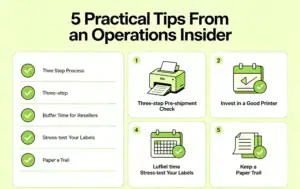
5 Practical Tips From an Operations Insider
Tip 1: Build a three-step pre-shipment check
-
Step one: Match FNSKU to SKU before labeling
-
Step two: Scan every label after sticking it on
-
Step three: Take photos before sealing the carton
Tip 2: Don’t cheap out on your printer
-
A 300 DPI industrial thermal transfer printer is the right tool
-
Regular home printers — especially inkjets — are not built for FBA labeling
Tip 3: Resellers — give yourself a buffer before the deadline
-
March 31, 2026 is a hard cut-off, not a suggestion
-
Finish your label conversion at least 2 months ahead
Tip 4: Stress-test your labels
-
Simulate heat, humidity, and friction during transit
-
Go with waterproof labels + thermal transfer ribbons
Tip 5: Keep a paper trail
-
Take clear photos of every labeled unit
-
Save your scan verification records
-
If something goes wrong, this might be your only evidence
Frequently Asked Questions
Q: I’m a brand owner. Do I need to label my products after March 31, 2026?
A: No. Brand owners can still use manufacturer barcodes like UPC or EAN and skip labeling. Your inventory will stay separate as usual.
Q: I’m a reseller. What about inventory already in transit or at the warehouse before March 31?
A: You’re fine. Inventory already at Amazon or on its way before March 31 doesn’t need to change. But any new shipment created after March 31 must use Amazon barcodes.
Q: Will Amazon still label my products for me?
A: No. Starting January 1, 2026, Amazon no longer offers labeling services. The only exception is shipments created before that date.
Q: Can labeling mistakes trigger extra fees?
A: Yes. Inbound defect fees apply based on product size tier. Wrongly routed shipments may also incur charges.
Q: Which lasts longer — direct thermal or thermal transfer labels?
A: Thermal transfer is much more durable. It resists heat, humidity, and rubbing. Direct thermal labels fade quickly in hot or damp conditions, so they’re not a good fit for ocean freight.
Q: Is it okay to cover a barcode with clear tape?
A: No. Tape creates glare that stops scanners from reading the barcode. Amazon explicitly says not to cover labels with tape.
Q: My shipment got rejected. What should I do?
A: First, check Amazon’s rejection report to understand why. Then fix the issue and relabel as needed. Keep all your labeling records — you may need them if you have to appeal.
Q: How many outer carton labels do I need?
A: At least 2 to 4 sides. This ensures the label is scannable no matter how the box is positioned on the warehouse line. Put each label in the center of the largest side, and don’t cover it with tape.
ABout AMZ Shipper
AMZ Shipper has several years of experience for international logistics Freight Forwarding service. Our service is for importer and exporter, foreign freight forwarders, local and abroad business. Export of 1500 of 40HQ per year for FBA Amazon shipping, 15-30tons of air shipments per month.
Member of WCA. Our company is a professional Amazon freight forwarder that specializes in providing comprehensive and efficient services to customers.